Claude's Workspace Add-On Lands in Docs, Sheets and Slides

Anthropic has put Claude inside Google Docs, Sheets and Slides. The Claude for Google Workspace add-on opens a sidebar next to your live file, reads what you have open, and edits it in place. New Google Docs, Sheets, and Slides connectors in Claude run the link the other way. Anthropic has not stated an announcement date. Both are in beta on all paid plans.
What Anthropic shipped, and when
Anthropic has released two connected things, announced together in its Anthropic announcement post on Claude in Google Workspace. The first is the Claude for Google Workspace add-on. The second is the set of Google Docs, Sheets, and Slides connectors in Claude.
Anthropic's post does not give an announcement date. It states clearly that both the add-on and the connectors are in beta, and that both are available on all paid plans. Access follows your Google sharing permissions.
The Claude for Google Workspace add-on is a sidebar assistant that reads the Google file you currently have open and edits it in place, with each edit approved by you before it lands.
How does the Claude for Google Workspace add-on work?
The add-on sits in a sidebar beside your file. It does not work from a copy or an upload. It reads what you have open and writes back into the same document. One install covers all three apps.
Sheets
In Google Sheets, the add-on builds formulas, pivot tables and native charts. Native matters here. These are real Sheets objects inside the file, not an image or a block of text describing what a chart would look like.
Docs
In Google Docs, the add-on makes in-place edits. Bigger rewrites arrive as suggestions you apply or dismiss, so a large change never lands silently in a document someone else is also working in.
Slides
In Google Slides, the add-on builds new slides from your deck's own layouts and theme. The output inherits the deck it joins rather than importing a generic template that then needs reformatting.
Install and approval
One install covers Docs, Sheets and Slides. You can approve each edit before it lands. That approval step is the practical control surface for anyone worried about an assistant rewriting a live commercial document.
What do the Google Docs, Sheets, and Slides connectors in Claude do?
The connectors work in the opposite direction. Inside Claude, you paste a file link or ask for a new doc, sheet or deck. The file opens beside the conversation, and you and Claude edit it together while you talk.
Access follows your Google sharing permissions. The integration inherits the file controls a team already has rather than creating a second, separate permission system to manage.
| Feature | Claude for Google Workspace add-on | Google Docs, Sheets, and Slides connectors in Claude |
|---|---|---|
| Where it runs | Sidebar inside Docs, Sheets and Slides | Beside the Claude conversation |
| How it starts | Reads the file you have open | Paste a file link, or ask for a new doc, sheet or deck |
| How edits land | In place, with each edit approved by you | You and Claude edit the open file together |
| Access model | Follows your Google sharing permissions | Follows your Google sharing permissions |
| Availability | Beta, all paid plans | Beta, all paid plans |
Table: the two halves of the release, as described in Anthropic's announcement. The add-on brings Claude to your file. The connectors bring your file to Claude.
Why distribution matters more than the feature list
Sidebar assistants are not new. Chart builders are not new. What is new is where this one sits.
Google Workspace has been the home turf of Gemini. Anthropic has now placed a competing assistant in the same sidebar space, reading the same commercial documents, on the same files, for anyone on a paid Claude plan.
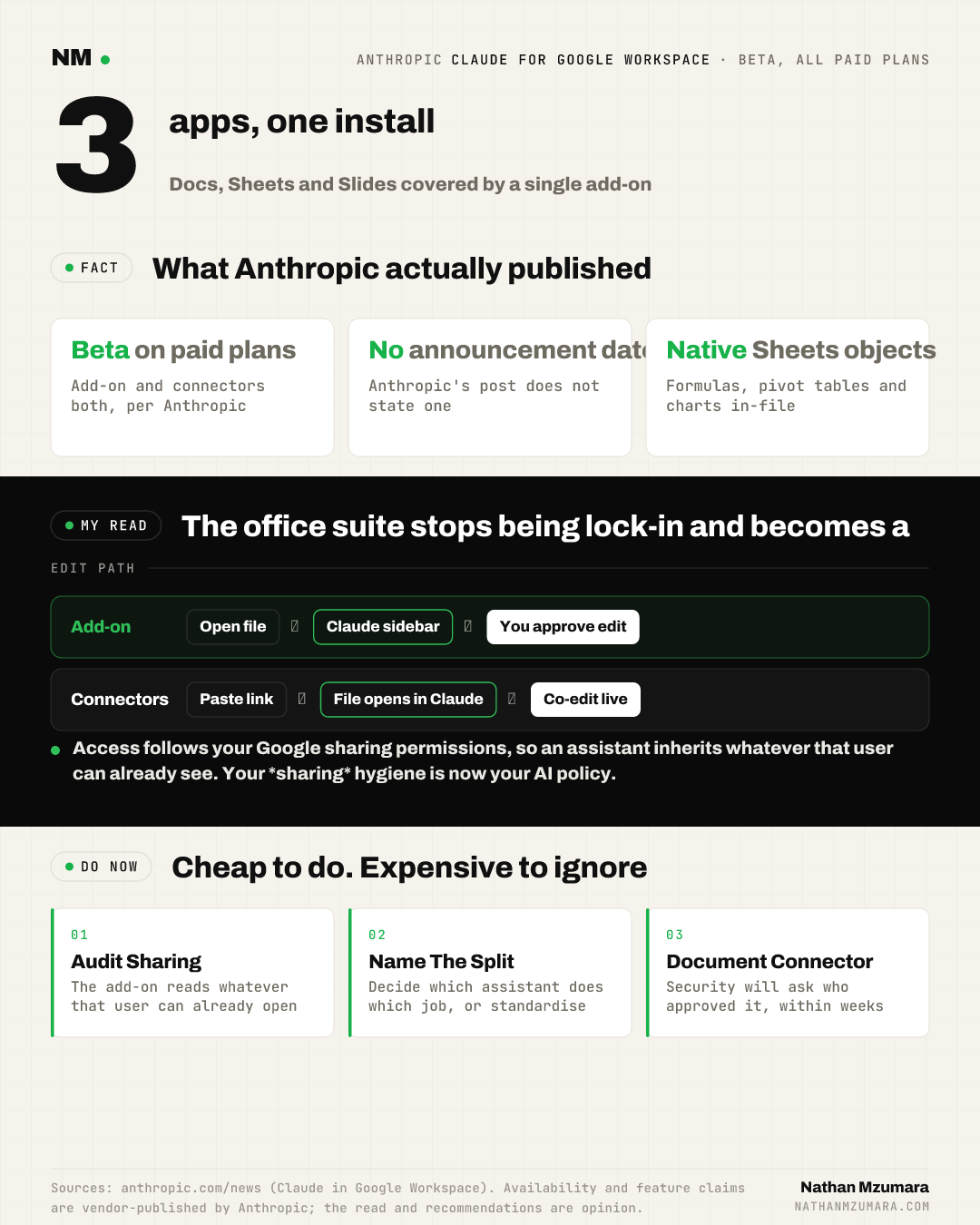
The closest precedent is the browser extension era, when the assistant you used stopped being decided by the browser you had installed. The add-on layer does the same thing to the office suite. My read is that the suite stops being a lock-in and becomes a neutral surface.
What this changes for marketing, growth and revenue leaders
Here is the plain English version for anyone running a marketing, growth or revenue function.
- Your assistant choice is no longer settled by procurement: paying for Google Workspace no longer decides which assistant your team uses inside Google Workspace. The Claude for Google Workspace add-on removes that default.
- The control point moves to the document: access follows your Google sharing permissions, so an add-on that can read an open file inherits whatever that user can already see. Your sharing hygiene is now your AI policy.
- Reporting work gets closer to the source: formulas, pivot tables and native charts are built inside the live Google Sheets file, which removes the copy-paste step between an assistant's output and the sheet your team actually reports from.
- Deck production changes shape: new slides built from your deck's layouts and theme means the board pack and the pitch deck stay on brand without a design pass.
- Two finance questions arrive together: expect finance to ask why you are funding two assistants, and expect security to ask who approved the connector.
In my experience, the second of those two questions arrives about three weeks after the first person installs something useful, and nobody has a documented answer ready.
Should you standardise on one assistant, or run Claude and Gemini side by side?
There is a real decision here, and it is not a tooling preference. It is a budget and governance call.
Standardising on one assistant is cheaper, simpler to train for and easier to audit. It also means you buy whichever assistant your suite vendor sells you, and you accept its ceiling on quality for the work your revenue team does most.
Running both is defensible if you can name the split. Most teams cannot. Anthropic has already shown it will push into categories where a single procurement decision used to settle everything, as it did when Claude for Government dropped seat fees for prepaid usage.
My recommendation is narrow: run both during beta, with a hard date to decide. Scope one function, usually revenue operations or content, and measure the output rather than the sentiment.
Who owns document-level access and edit approval?
Nobody, in most organisations, which is the risk. The add-on inherits your Google sharing permissions, so a user with broad access brings broad access with them into the sidebar.
Assign an owner this quarter. That owner holds three things: which Workspace users may install the add-on, which folders are in scope, and who reviews the approve-each-edit behaviour on files that feed board or investor reporting.
Edit approval is a genuine safeguard. Bigger rewrites in Docs arrive as suggestions you apply or dismiss, and every edit can be approved before it lands. A safeguard only works if someone is accountable for using it.
The counter-view: why this may change less than it looks
Both the add-on and the connectors are in beta. Beta features get withdrawn, rescoped and repriced. Nothing here is a stable foundation for a two-vendor strategy yet.
There is also a reasonable argument that most teams will not run two assistants for long. Habit is powerful, the assistant already built into the suite is one click closer, and a second licence is an easy line for finance to cut. The same gravity shapes how Google keeps extending its own assistant surfaces, as seen when Google Ask Advisor promised first insight in minutes.
For the opposite reading to hold, Claude's output quality inside live files would need to be visibly better, not marginally better, for the work your team repeats weekly.
What to do this week with Claude in Google Sheets
- Decide who may install the Claude for Google Workspace add-on, before anyone does it informally.
- Audit sharing permissions on your revenue reporting folder, because access follows your Google sharing permissions.
- Pick one recurring task, such as a weekly pivot table and native chart refresh, and run it in both assistants for two weeks.
- Name an owner for document-level access and edit approval, and put the review in a calendar.
- Set a decision date for standardising or running both, and tell finance the date.
The honest summary is that a beta add-on has quietly changed a procurement assumption. Anthropic's Claude for Google Workspace add-on and the Google Docs, Sheets, and Slides connectors in Claude are both free of extra charge on paid plans, both inherit your existing file controls, and both are available now. Start with the permissions on your most sensitive sheets, then decide which assistant earns the work.