OpenAI Dots: Always-On Agents Land on Business Plans

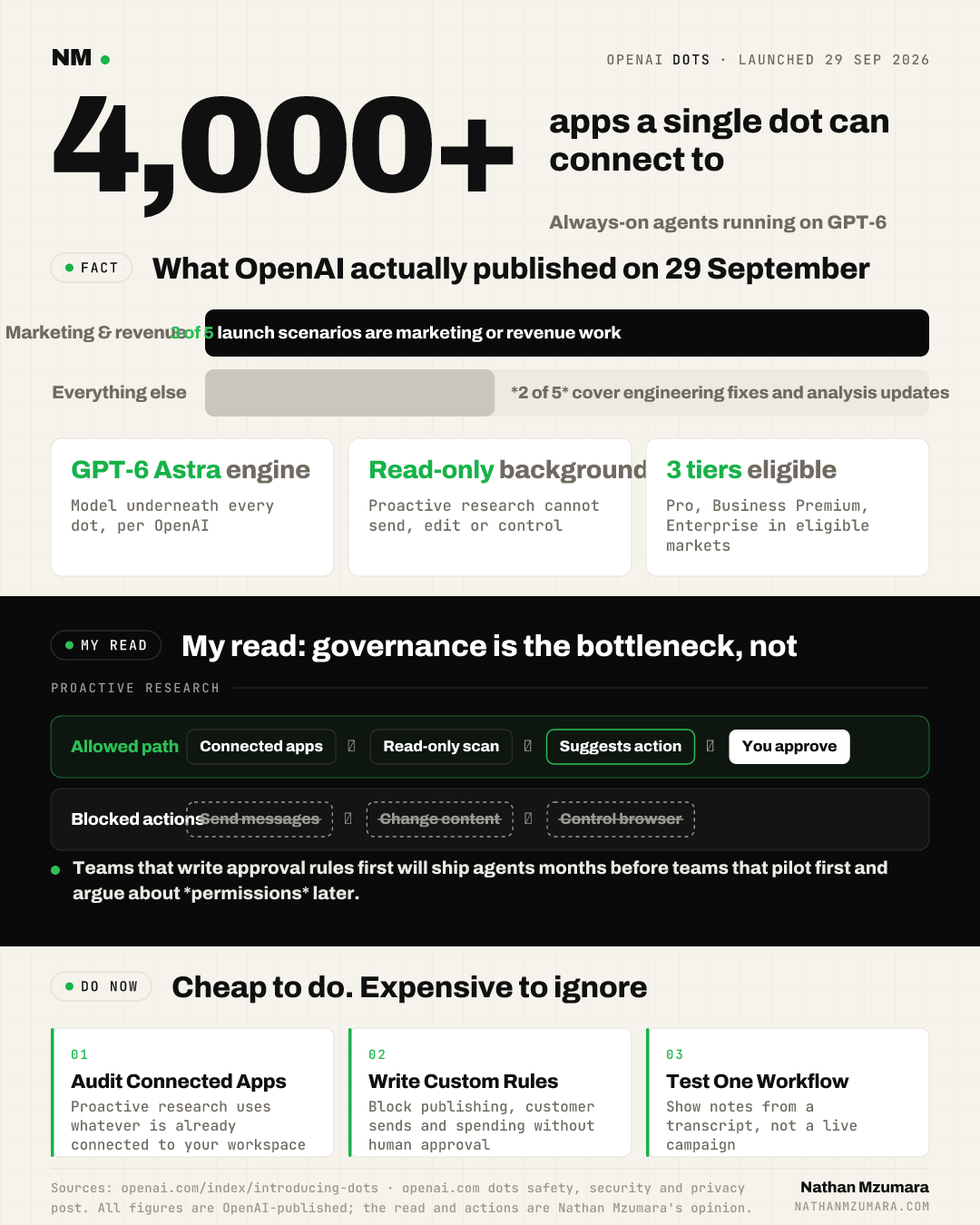
OpenAI dots arrived on 29 September 2026. Dots are always-on AI agents, powered by GPT-6 Astra, that run on their own cloud computer, connect to over 4,000 apps through OpenAI's plugin ecosystem, and can work towards your goals 24/7. OpenAI has begun rolling them out across Pro, Business Premium and Enterprise plans in eligible markets.
In plain terms: a dot is a named agent you set up once, that keeps working when you close the laptop. OpenAI describes dots as agents that get to know what matters to you and take work off your plate. You can read the full announcement in OpenAI's introducing dots post.
What OpenAI actually shipped on 29 September 2026
Dots have their own cloud computer and their own browser. You can open that computer at any time to inspect the work. You can also give a dot permission to use your own laptop, but your machine and its contents stay separate unless you choose to connect it.
You reach a dot in ChatGPT on desktop, web and mobile, and you can message it in Slack and Teams. OpenAI says texting is coming soon. Dots carry context across every channel, so the same agent has your full history wherever you pick up the thread. This is a wider surface than the connected-app model described in the ChatGPT voice and plugins update.
The model underneath matters for cost and speed. Dots run on GPT-6 Astra, the same model covered in our note on GPT-6 Astra and Parallel's research time.
Why should marketing and growth leaders care?
Three of the five scenarios OpenAI published are marketing and revenue work. That is the signal. OpenAI is not positioning dots as a coding tool with marketing as an afterthought.
| Scenario in OpenAI's launch | What the dot does |
|---|---|
| Revise a launch as scope changes | Learns your audience, positioning and creative standards, then revises launch materials and prepares drafts of asset and doc changes when scope shifts. |
| Automate content production work | Learns your voice, identifies clip moments in a new interview transcript, prepares show notes and drafts social posts for approval. |
| Update a proposal as requirements shift | Checks customer requirements against product docs, builds a proof of concept, updates the proposal and test plan, and flags open concerns. |
| Turn feedback into tested fixes | Watches customer feedback for recurring requests, scopes bugfixes, builds and tests them, and brings complete PRs with attached videos. |
| Update analysis with new evidence | Reruns analyses as new data arrives, investigates unexpected results and updates figures. |
OpenAI also says its internal pilots for specialist dots cover procurement, invoice processing, email marketing, customer support and commercial contracting. Email marketing sitting in that first list of five is worth noticing if you own the channel.
One example from the launch shows the direction of travel. An early tester's dot noticed he had forgotten to invoice a publication, prepared the invoice, and sent it after his approval. The agent found the task, rather than being given it.
How proactive research and permissions work
OpenAI calls the background behaviour proactive research. When you are not actively working with your dot, it looks for ways to help using the apps you have already connected. Those tools are restricted to read-only, so the dot cannot send messages, change app content, or control your browser or computer during proactive research.
The controls OpenAI published are worth learning before you switch anything on.
- Custom Rules: you can allow specific actions, require approval, or block them. Built-in safety requirements always apply on top.
- Auto-review: dots check actions that could affect your accounts or share information against your instructions, Custom Rules and safety requirements. See the auto-review documentation.
- Activity View: you can follow progress, including background work, and redirect the dot.
- Hard stops: certain sensitive tasks, such as changing a password, always stay with you.
- Training data: OpenAI does not use content from ChatGPT Business, Enterprise or Edu workspaces to improve its models by default. On personal plans, you control this.
OpenAI is explicit that dots can still make mistakes and that you should always review consequential work. Its full position is set out in the dots safety, security and privacy post.
Specialist dots and the Microsoft Agent 365 link
Specialist dots are different from your own dot. Your company gives each one its own identity, credentials and access to the systems it needs. OpenAI is starting with focused enterprise pilots, where its engineering teams define each dot's responsibilities, its tools, and how people review and approve its work.
OpenAI is also working with Microsoft to integrate specialist dots with Agent 365, so businesses can manage dots through Microsoft governance and security tools they already use. If your IT function runs Microsoft, that integration decides how quickly you get approval.
What to do this week with OpenAI dots
- Check whether your plan qualifies. Dots are rolling out on Pro, Business Premium and Enterprise in eligible markets, not on every tier.
- List the connected apps in your workspace before anyone creates a dot. Proactive research uses what is already connected.
- Write your Custom Rules for the three actions you never want an agent to take without approval. Publishing, sending to a customer list, and spending money are the obvious three.
- Pick one narrow, low-risk workflow to test. Show notes from a transcript is a better first trial than a live campaign.
- Agree who reviews agent output. OpenAI's own guidance is that consequential work needs a human check.
My read is that with OpenAI dots the governance work is the bottleneck, not the capability. The teams that write their approval rules first will ship agents months before the teams that start with a pilot and argue about permissions later.