Google Analytics Conversion Window Now Goes to 90 Days

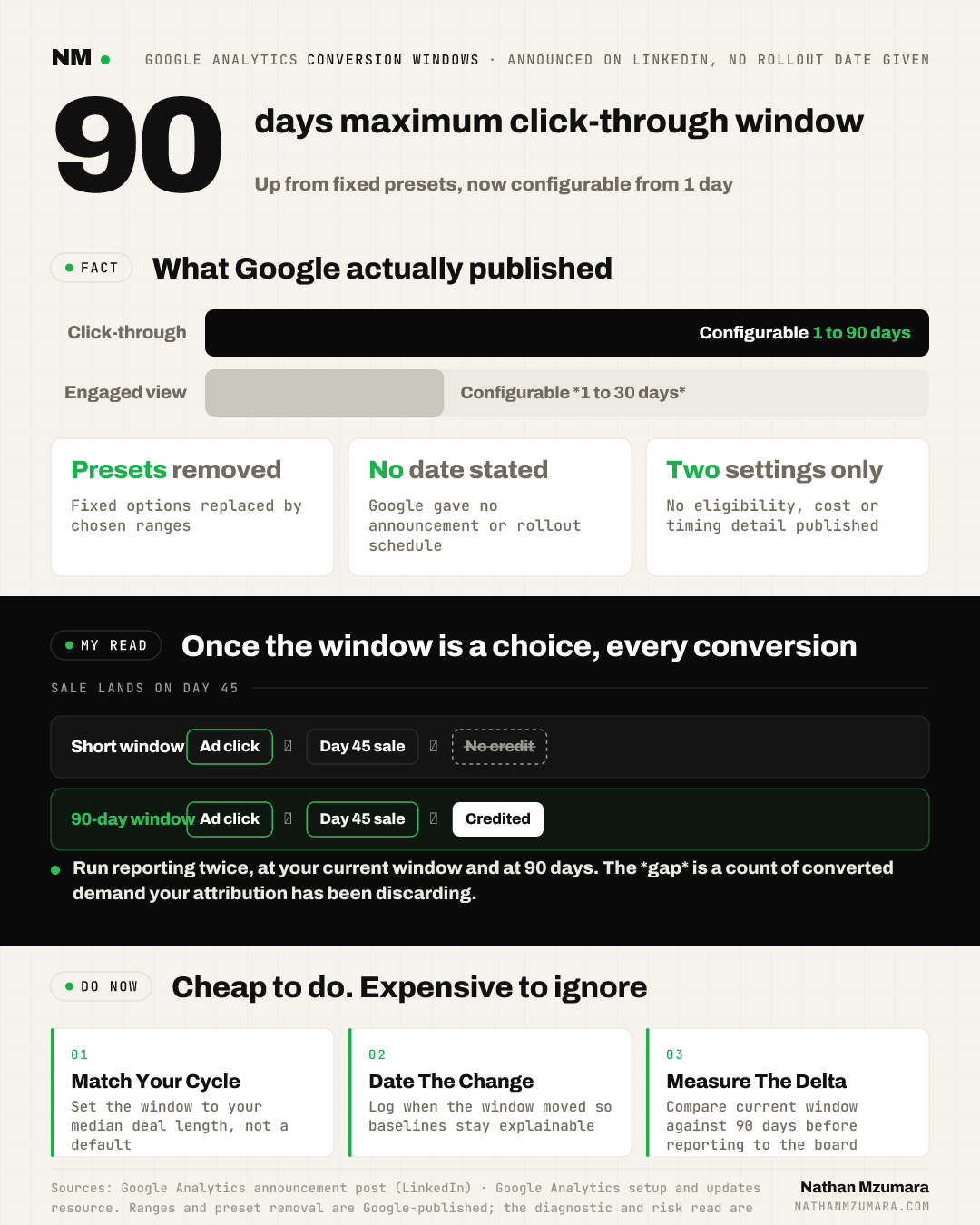
Google has updated the conversion window configurations in Google Analytics. Advertisers can now set a click-through conversion window anywhere from 1 to 90 days, and an engaged-view conversion window from 1 to 30 days. The fixed presets are gone. Google has not stated an announcement date or a rollout schedule.
On the surface this is a settings change buried in an admin panel. In practice it is the first attribution control that lets most teams model a sales cycle as it actually runs, rather than as a default decided for them.
What changed in Google Analytics conversion window configurations
Google Analytics updated its conversion window configurations to replace rigid presets with ranges you choose. The announcement, published by Google on LinkedIn, sets out four things and no more.
- Click-through windows: configurable from 1 to 90 days.
- Engaged-view windows: configurable from 1 to 30 days.
- Presets removed: the update replaces rigid presets with configurable windows.
- Google's stated purpose: to align reporting directly with how your customers actually buy, so your attribution model keeps up with your real sales cycle.
Google points users to further guidance at its Google Analytics setup and updates resource to master the setup. Beyond the two ranges and the removal of presets, the original Google Analytics announcement post gives no detail on timing, eligibility or cost.
What is a conversion window, and why does the range matter?
A conversion window is the period of time after a click or a view during which a later conversion is still credited back to that interaction. If someone clicks an ad on day one and buys on day 45, a 30-day window discards that sale. A 90-day window keeps it.
That single setting decides whether a channel looks profitable or looks like waste. It is not a reporting preference. It is the boundary of what your data is allowed to see.
Google's post does not define engaged view in this update. It simply confirms the engaged-view conversion window is now configurable from 1 to 30 days.
| Setting | Minimum | Maximum | Before this update |
|---|---|---|---|
| Click-through conversion window | 1 day | 90 days | Fixed presets |
| Engaged-view conversion window | 1 day | 30 days | Fixed presets |
Why a settings change is really an attribution change
Fixed presets held one assumption steady across every account: that buying cycles are roughly the same length. They are not. A 12-pound subscription and a 120,000-pound enterprise contract were measured on the same clock.
Configurable windows break that assumption, and they break it in both directions. A grocery retailer can tighten to a handful of days and stop crediting demand that was already there. A B2B software firm can stretch to 90 days and finally see pipeline that its reports have been quietly throwing away.
Here is the consequence nobody puts in the release note. Once the window is a choice, every reported conversion number is a choice too. It is no longer a fact you inherit. It is an output of a decision someone on your team made, on a date you may not have recorded.
What this means for growth leaders, CMOs and founders
The practical effect depends on your role and your deal cycle. In plain English:
- For CMOs and VPs: your ROAS is now partly a settings decision. If someone widens the click-through conversion window from a preset to 90 days mid-quarter, paid and organic credit inflates overnight and the board sees performance that did not happen.
- For growth leaders: quarter-on-quarter comparisons break the moment the window moves. Trend lines that cross a configuration change are not trend lines, they are two different datasets on one chart.
- For search-marketing professionals: organic and brand search have always been the channels most punished by short windows, because they sit at the end of long discovery journeys. A longer window will show more of that value.
- For founders in B2B or high-ticket categories: if your median deal takes 60 days and your reporting stops at 30, you have been making budget decisions on a partial picture. The 90-day ceiling now covers most mid-market cycles.
The diagnostic nobody is talking about
The obvious use of configurable windows is to set a better default and move on. The more valuable use is comparative.
Run your reporting twice. Once at your existing window, once at 90 days. The gap between the two is a measured read on how much converted demand your attribution has been discarding. Not a model, not an estimate. A count.
From my observation across long-cycle accounts, a meaningful share of that gap sits in journeys that begin in AI assistants and AI Overviews, then surface weeks later as branded search or direct. Those sessions arrive with no visible first touch, so a short window drops them entirely. For most teams, that delta will be the closest thing to a generative engine optimisation number they get this year, and it pairs well with the stage model for brand visibility in AI search. It is a hypothesis you can now test with a setting rather than argue about in a deck.
The risks: three ways this goes wrong
A configurable window is easy to abuse, usually without anyone meaning to.
- Silent inflation: widening the window increases credited conversions without increasing revenue. Finance will notice the mismatch before marketing does.
- Broken baselines: if the change date is not documented, nobody can explain why performance jumped in week three of the quarter. Attribution arguments cost more time than most testing programmes.
- Window shopping: the temptation to tune the window until the channel you like looks good. Once a setting is adjustable, it becomes a lever for making a case rather than measuring one.
Google frames the update as aligning reporting with how customers actually buy. That framing is correct and it is also the risk. Alignment is a judgement, and judgements drift towards whatever makes the quarter look better.
The counter-view: longer is not better
The reflex reaction to a 90-day ceiling is to use it. That would be a mistake for most accounts.
A long window does not create demand, it reassigns credit. Stretch a click-through window far past your real cycle and you start attributing sales to touchpoints that had little to do with them, which over-credits paid activity and hides how much of your revenue is genuinely incremental.
My read is that more teams need to shorten than lengthen. If your median order is transactional, a 7 or 14 day window will give you faster, cleaner feedback than 30 ever did. The right setting is the one that matches your evidence, not the one that produces the biggest number. For teams already rebuilding reporting around new surfaces, this sits alongside the shift covered in web multimodal reporting in Search Console.
What to do with your conversion window before Q4 planning
- Audit the current setting. Find out what your click-through and engaged-view windows are today. In most accounts, nobody knows.
- Quantify the delta. Pull the same period at your current setting and at 90 days. Record the difference in conversions by channel.
- Get the real cycle length. Take the median time from first touch to closed deal from your CRM, not from a guess.
- Set once, then freeze. Align the window to that median, write down the change date, and leave it alone for at least two quarters.
- Rebaseline before budgets lock. Restate prior periods on the new setting so Q4 planning is not built on two incompatible datasets.
Do this before budget planning closes. A conversion window set to flatter last quarter will fund the wrong channel for the next twelve months, and by the time the numbers unwind, the money is already spent.