Google Play Store App Discovery Shifts to AI Surfaces

Google has pushed a set of Google Play updates that change how a Google Play store app gets found. Announced in a developer post published alongside the Google Play updates October 2026 announcement, the changes cover Ask Play comparisons, Game finder, Play in Gemini, Engage SDK, and new player engagement tools. Quality programs tied to lower service fees also expand.
What changed on Google Play, and when
Google published a developer post on Google Play discovery, engagement and growth setting out the next chapter of its "More than a store" vision, alongside the Google Play updates October 2026 announcement. The post is dated "today" and carries no explicit calendar date. Google frames the You tab as a personalised home base for your favourite apps and content, and Play Games Sidekick as connecting over 2 billion players.
The stated goal for developers is to help them connect with their audience and build a sustainable business. That means optimising apps for the latest discovery features, deepening player engagement, and rewarding great user experiences with lower service fees.
| Feature | What it does | Availability as stated |
|---|---|---|
| Game finder | Recommends games and explains why | Begins rolling out to English-language users in the US today |
| Play Games Rewards | Ongoing in-game rewards that sync with Play Points | Generally available |
| Play Console visual refresh | Updated developer interface | Rolling out this month |
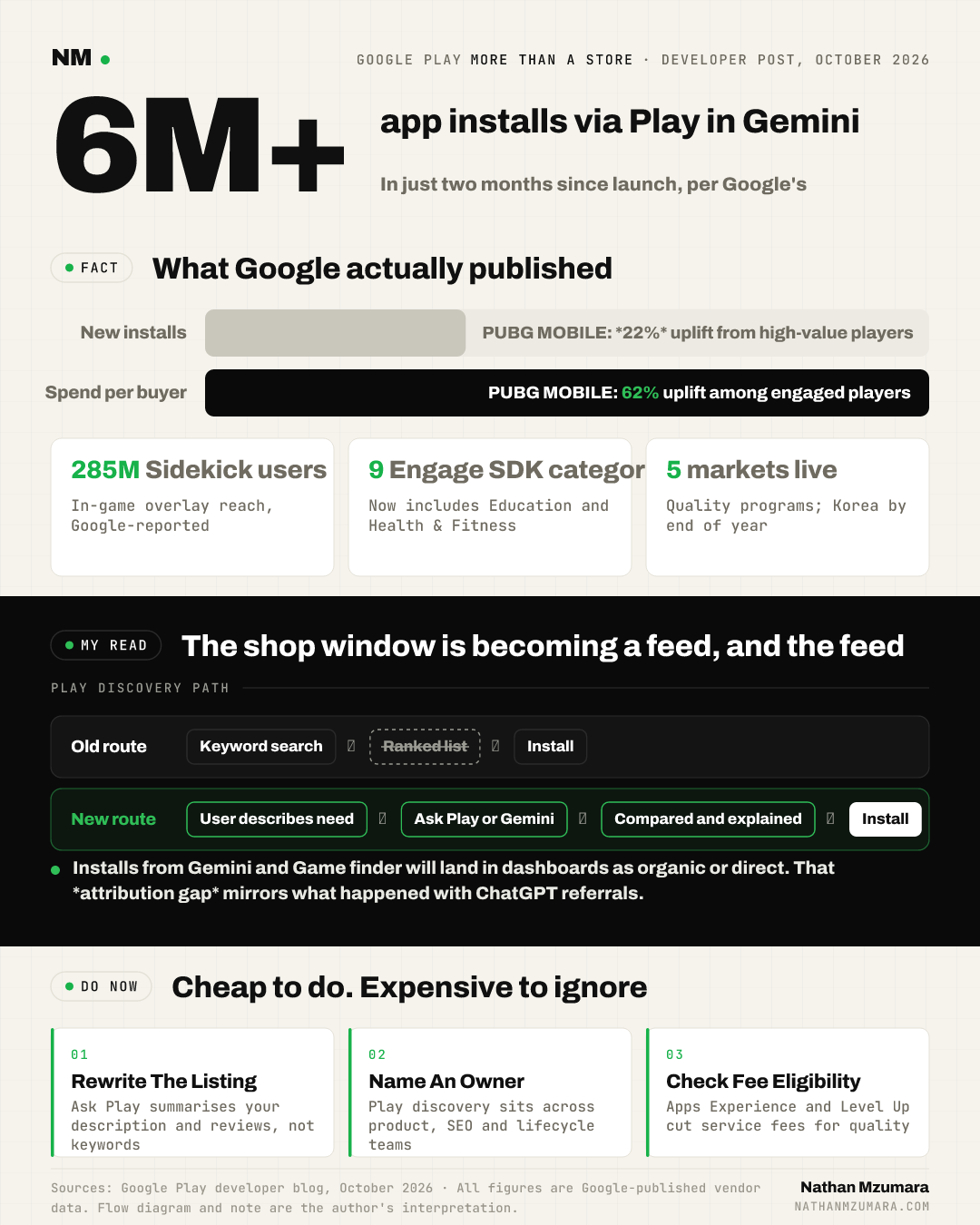
| Apps Experience and Level Up | Quality programs tied to lower service fees | Australia, Japan, the EEA, UK and US, with Korea by the end of the year |
Enrolment submission and management for both quality programs is now available directly in Google Play Console, and the programs reach Google Play UK and EEA developers already.
How do the new Google Play discovery surfaces work?
Google Play discovery is moving from a ranked list of search results towards conversational and personalised surfaces that summarise, compare and explain. Four features carry that shift.
Ask Play app comparisons
Ask Play helps users find the right app through natural conversation, understanding context and adapting to follow-up questions. It can now generate dynamic, side-by-side app comparisons directly in search results. When a user compares details like Google Play subscriptions or offline capabilities, Ask Play summarises your store listing and user reviews so they can choose with confidence.
Game finder
Game finder is tailored by each player's gameplay habits, favourite mechanics and community reviews. It explains why a title is recommended and highlights what similar players, and profiles you follow, are enjoying. Game finder begins rolling out to English-language users in the US today.
Play in Gemini
Play in Gemini has driven over 6 million app installs in just two months since launch, according to Google's developer post. When someone describes a need, such as organising family recipes or finding a collaborative task manager, Gemini matches the request to your store listing and key features. Those same app recommendations are now available through voice conversations with Gemini Live.
Engage SDK and deep links
Engage SDK delivers personalised content across surfaces including Apps Home, the You tab and Android tablets, and now supports 9 categories, including Education and Health & Fitness. Google Play Console also has a new built-in deep link emulator so teams can preview and test links without a physical device.
Why engagement signals now shape what gets surfaced
Google is handing games platform-level competition and reward mechanics rather than asking studios to build them. Sidekick, the in-game overlay, has now reached over 285M users, and new Playbacks lets players capture 30-second clips of their top plays to share with friends without leaving the game.
Sprints are fast-paced, 48-hour challenges that match 2 to 5 players of similar skills. They build on Leagues, which turn in-game leaderboards into month-long competitive seasons. Quests are expanding beyond Google Play Points to include in-game rewards such as character skins, performance boosters and valuable currencies.
Two integrations unlock all of it. Game Stats shares basic gameplay event signals such as match completions, score thresholds or key milestones, which show daily Streaks and qualify a title for Leagues and Sprints. Play Games Rewards, now generally available, lets developers set up ongoing in-game rewards that celebrate achievements and sync with Play Points.
What this means for CMOs, growth leaders and founders
In plain English: the shop window is becoming a feed, and the feed reads your product, not just your keywords. Here is the practical translation.
- Budget: Owned Play discovery work now has a measurable job. Google reports that PUBG MOBILE, using Level Up guidelines, drove a 22% uplift in new installs from high-value players and a 62% uplift in spend per buyer among engaged players. Summoners War and Fruit Ninja are also cited.
- Ownership: Store listings, media assets, deep links and Engage SDK content sit across product, SEO and lifecycle. If app store discovery is still parked with a paid UA manager, nobody owns the surfaces that now drive a Google Play store app install.
- Margin: The Apps Experience and Level Up programs reward great user experiences with lower service fees, which makes quality work a finance conversation, not just a product one.
- Content quality: Ask Play summarises your listing and your reviews. Thin descriptions and stale screenshots become a retrieval problem, in the same way that Google's guidance on generative AI content made quality the gate for web visibility.
- Measurement: Installs arriving from Gemini conversations and Game finder recommendations will look like organic or direct volume in most dashboards. That is the same attribution gap teams hit when ChatGPT referral tracking collapsed into direct traffic.
The precedent: storefronts that turned into feeds
Social platforms went through this already. Reach moved from the follow graph to the recommendation model, and the teams that kept optimising for followers lost share to teams that optimised for watch time and completion. Google Play is running the same play with install intent, and the signals it rewards are engagement signals.
My read is that the Level Up figures are the tell. Google is publishing uplift numbers for high-value players and spend per buyer because it wants budget moved into retention and quality, not just into bids.
What could go wrong
Three risks stand out. Game finder is English-language and US-only at launch, so most markets cannot test the recommendation surface yet. Attribution for AI-surfaced installs is unclear, which makes it hard to defend a budget shift to a board. And platform-level mechanics such as Leagues, Sprints and Quests put part of your engagement loop inside Google's product, not yours.
The counter-view
A fair objection: none of this removes paid user acquisition. Paid still buys volume on demand, and the only install number Google published for an AI surface is over 6 million from Play in Gemini in two months, which is small against total Play volume. If you are scaling fast, cutting paid to fund listing work would be premature. The honest position is additive, not substitutive, until the data in your own console says otherwise.
What to do about Google Play store app discovery this week
- Refresh descriptions, tags and promotional events in Google Play Console so Ask Play has current material to summarise, including how your Google Play subscription options work.
- Upload high-resolution media assets that hold up across screen sizes and devices.
- Validate deep links using the new built-in deep link emulator in Play Console.
- Scope Engage SDK against the 9 supported categories and the You tab.
- For games, assess Game Stats and Play Games Rewards, and check eligibility for the Apps Experience and Level Up programs in your market.
- Name one owner for app store discovery, and add an AI-surface install line to your weekly growth report.
In my view the budget question answers itself once ownership is fixed. Move a defined slice of paid UA into listing quality, deep links and engagement integrations, run it for a quarter, and compare install quality rather than install volume. Google Play store app growth is now earned on surfaces that explain their recommendations, and those surfaces read your product the way a user would.
Tags